Best Screen Printing Machine for T-Shirts and Textiles
If you're looking for the best screen printing machine for T-shirts, hoodies and textile printing, the right choice depends on your production goals, experience level and workspace. For beginners, a manual screen printing machine is usually the best starting point — it's easier to manage, more affordable, and lets you learn the full process hands-on. For growing businesses and professional workshops, machines with integrated UV exposure units offer more speed and consistency from day one.
This guide walks through everything you need to know before buying a screen printing machine: how the different types work, what to look for, and which specific machines Keygadgets offers for T-shirt and textile printing.
- Best for T-shirts, hoodies, tote bags and other garments
- Suitable for beginners, small businesses and professional print shops
- Available in manual and all-in-one configurations with UV exposure
- Useful for short runs, custom jobs and larger textile production
Table of Contents
- What is a screen printing machine?
- How does screen printing work?
- Types of screen printing machines
- Best screen printing machine for beginners — K-SER Zero
- Best all-in-one setup — K-SER1 Evo Kit
- What to consider before buying
- Which materials can be printed?
- Care and maintenance tips
- FAQ
1. What is a screen printing machine?
A screen printing machine is a system used to transfer ink through a mesh screen onto a surface such as fabric, paper, plastic or wood. It is one of the most reliable printing methods for textiles because it produces strong colour coverage, long-lasting results and consistent print quality across multiple items.
For T-shirt printing, screen printing machines are especially popular because they allow you to produce custom garments with sharp details and durable ink deposits that survive repeated washing.
2. How does screen printing work?
Screen printing works by creating a stencil on a mesh screen using photosensitive emulsion and UV exposure. Ink is then pushed through the open areas of the mesh using a squeegee, transferring the design directly onto the material below.
The process has five stages: coating the screen with emulsion, exposing your artwork under UV light, washing out the stencil, printing with a squeegee, and curing the ink with heat. Once you have a working screen, you can produce hundreds of identical prints from the same stencil.
3. Types of screen printing machines
There are two main types relevant for T-shirt printing at home or in a small studio:
- Manual screen printing presses — you coat and expose screens separately, then use the press for printing. Lower entry cost, full control over each stage of the process.
- All-in-one machines with integrated UV exposure — the machine handles both screen exposure and printing. Faster workflow, fewer separate pieces of equipment, better suited for regular production.
For high-volume commercial operations, semi-automatic and automatic carousel systems exist, but these are a different category entirely — much higher investment and beyond the scope of this guide.
4. Best screen printing machine for beginners — K-SER Zero
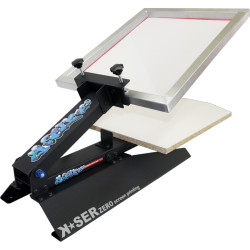
The K-SER Zero is Keygadgets' entry-level manual screen printing press, designed for beginners and small-scale production. It gives you a stable, compact setup for printing T-shirts, hoodies, tote bags and other flat textiles without the complexity or cost of an integrated system.
What makes it practical for beginners:
- Gas spring holds the screen frame open — both hands free for the squeegee stroke
- Shaped wooden printing board sized for standard T-shirts
- Adjustable frame system, compatible with aluminium and wooden frames
- Freestanding — stable on any worktable, no wall mounting required
- Print area: 380 × 540 mm
You'll need a separate UV light source to expose your screens, but for most beginners this is not a drawback — it keeps the initial investment lower and gives you full control over each stage separately. All consumables (emulsion, squeegees, inks) are available in our screen printing supplies section.
→ View the K-SER Zero
5. Best all-in-one setup — K-SER1 Evo Kit
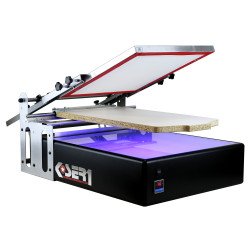
The K-SER1 Evo is Keygadgets' all-in-one screen printing machine with an integrated UV exposure unit and digital timer. It combines screen preparation and printing in a single machine, which means you don't need a separate exposure lamp or exposure unit — everything happens on the machine itself.
Key specifications:
- Print area: 400 × 600 mm — suitable for standard T-shirts and large logo prints
- Integrated UV exposure unit with digital timer for reproducible results
- Patented modular system — expandable with additional colour modules
- Compatible with textiles, paper, wood, metal, plastic and plexiglas
- Dimensions: 800 × 600 × 350 mm / Weight: approx. 19 kg
- Power: 230V / 50Hz
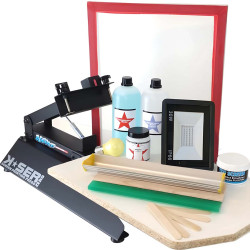
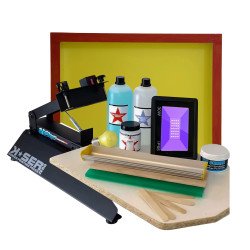
The K-SER1 Evo is available as a complete kit that includes: the machine, a pre-stretched aluminium screen (40×50cm, 55-count mesh), 35cm scoop coater, 33cm squeegee, Plus 7000 emulsion with Diazo sensitiser, and 1kg textile ink. Everything you need to start production from day one.
→ View the K-SER1 Evo complete kit
6. What to consider before buying a screen printing machine
Before choosing, think honestly about how you'll use the machine:
- Print area: the K-SER Zero covers 380×540mm, the K-SER1 Evo covers 400×600mm. Both handle standard T-shirt prints comfortably.
- UV exposure: if you want to handle everything in one machine, the K-SER1 Evo includes the exposure unit. If you prefer a lower entry cost and don't mind working in stages, the K-SER Zero paired with a separate UV lamp works well.
- Production volume: for occasional printing and first projects, the K-SER Zero is sufficient. For regular daily production, the K-SER1 Evo's integrated workflow saves time.
- Budget: the K-SER Zero is the more affordable entry point. The K-SER1 Evo kit costs more but includes all consumables and the UV unit — which you'd need to buy separately with the K-SER Zero anyway.
- Expandability: the K-SER1 Evo uses a patented modular system that allows additional colour modules to be added as your production grows.
7. Which materials can be printed?
Both machines work with a wide range of materials depending on the ink used:
- Textiles: T-shirts, hoodies, sweatshirts, tote bags — the primary use case for most customers
- Paper and cardboard: posters, packaging, art prints
- Wood: decorative and promotional projects
- Plastic, metal and plexiglas: supported by the K-SER1 Evo with the appropriate ink system
For textile printing, we recommend our ACRILTEX water-based inks for light fabrics and plastisol inks for dark garments requiring maximum coverage.
8. Care and maintenance
Both machines require minimal maintenance, but cleaning after each print session is essential:
- Remove excess ink from the screen immediately after printing — before it dries
- Wash screens with water and a scrub pad for water-based inks
- Reclaim screens with emulsion remover when changing designs
- Degrease the mesh before recoating with fresh emulsion
- Check frame alignment and squeegee condition regularly
Keygadgets – 40 Years of Screen Printing Experience
Keygadgets has been supplying screen printing machines and consumables for over 40 years. Every machine in our catalogue has been tested in real production environments — not just specified on paper. We ship across Europe and worldwide.
Not sure which machine is right for your setup? Write to us on WhatsApp — we'll tell you exactly which one suits your production volume and workspace.
9. FAQ – Screen Printing Machines
What is the difference between the K-SER Zero and the K-SER1 Evo?
The K-SER Zero is a pure manual press — you expose screens separately with a UV lamp, then use the machine for printing. The K-SER1 Evo integrates a UV exposure unit with a digital timer directly into the machine, so you can coat, expose and print without switching between separate pieces of equipment. The K-SER1 Evo also has a larger print area (400×600mm vs 380×540mm) and is available as a complete kit with all consumables included.
Can I screen print T-shirts at home with these machines?
Yes. Both machines are designed for home and small studio use. They're freestanding, compact enough for a standard worktable, and don't require wall mounting. The K-SER Zero is the simpler starting point; the K-SER1 Evo kit gives you everything in one box including the UV exposure unit.
Do I need a separate UV exposure unit with the K-SER Zero?
Yes. The K-SER Zero is a printing press only. To prepare your screens you'll need a UV light source — either a dedicated UV exposure lamp (available in our supplies section) or direct sunlight (weather-dependent). If you want to avoid managing separate equipment, the K-SER1 Evo includes the UV unit built in.
How many T-shirts can I print per day with a manual machine?
With a manual machine like the K-SER Zero or K-SER1 Evo, an experienced operator can comfortably print 80–150 single-colour shirts per hour in a steady production rhythm. For short runs of 20–50 pieces, a manual machine handles the job efficiently without the need for larger equipment.
What inks should I use for printing on T-shirts?
For light-coloured T-shirts, water-based inks (such as our ACRILTEX range) are the easiest to work with — they clean up with water, have low odour and cure at lower temperatures. For dark T-shirts, plastisol inks give better coverage and vibrancy. Both ink types are compatible with the K-SER Zero and K-SER1 Evo.
Can I expand the K-SER1 Evo for multicolour printing?
Yes. The K-SER1 Evo uses a patented modular system that allows additional colour modules to be added. For each extra colour you need a separate screen and a dedicated print pass. For occasional two-colour work, this is manageable manually; for regular multicolour production the modular expansion is worth considering.