
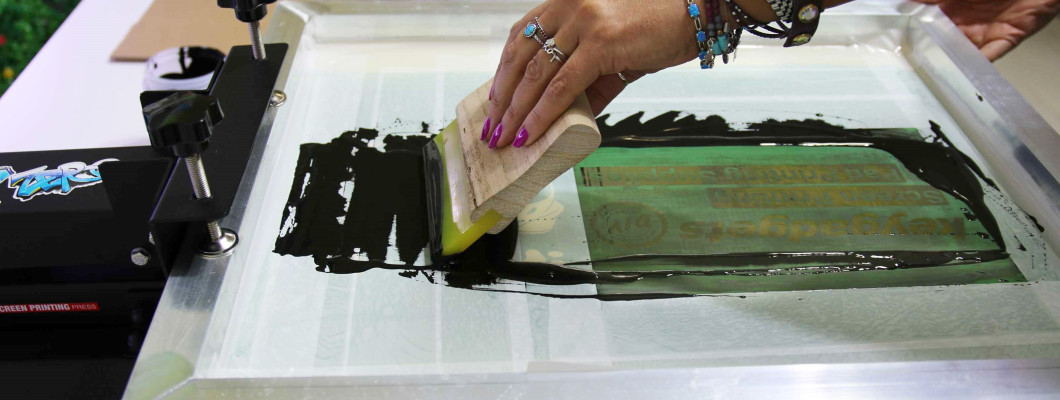
You've tried screen printing at home but the results aren't what you expected? Blurry edges, ink bleeding, emulsion that won't hold, screens that clog up. It happens to everyone, especially at the beginning. The good news is that almost every DIY screen printing mistake has a specific cause — and an equally specific solution.
This guide covers the most common errors beginners make when screen printing at home, with clear explanations of what went wrong and how to fix it.
Looking for a complete kit to get started? Check out our screen printing kits for beginners.
Mistake 1 – Uneven emulsion coating
What happens: the print shows areas with too much coverage and areas where ink doesn't pass through at all. The edges of the design are irregular.
Why it happens: the emulsion was applied with the scoop coater tilted, moved too fast, or with uneven pressure. An uneven layer means some areas will expose differently under UV light.
How to fix it: keep the scoop coater in constant contact with the frame, apply steady pressure and move at a consistent speed. Apply two passes — one per side — for a uniform layer. Always use a scoop coater sized appropriately for your screen.
Mistake 2 – Wrong exposure time
What happens: if you underexpose, the emulsion washes away even where it shouldn't. If you overexpose, the areas that should open up stay blocked and the design doesn't form properly.
Why it happens: exposure time depends on many factors — emulsion type, layer thickness, UV source distance and power, ambient temperature. Using sunlight adds the variable of weather conditions.
How to fix it: always run an exposure test with a stepped time scale before exposing production screens. If using a UV lamp, follow the emulsion manufacturer's instructions. A dedicated exposure unit removes the sunlight variable entirely.
Mistake 3 – Film positive not opaque enough
What happens: the design on the screen comes out blurry, with soft edges or partially open areas where emulsion should remain.
Why it happens: the black ink on the transparency film isn't fully opaque to UV light. Light partially penetrates even the black areas, hardening the emulsion where it should stay soft.
How to fix it: print your design at maximum ink density. If using transparency paper instead of film, layer two copies of the same sheet to increase opacity. Check by holding the printed sheet up to light — almost no light should pass through the black areas.
Mistake 4 – Screen not in contact with the substrate during printing
What happens: the print edges are blurry, the image appears doubled or with halos.
Why it happens: the screen doesn't fully adhere to the printing surface during the squeegee stroke. Ink deposits on the sides of the contact zone, creating irregular edges.
How to fix it: make sure the screen is properly positioned with minimal off-contact distance — around 2-3 mm. A screen printing press with precise adjustment eliminates this issue. If using a hinge clamp system, check that the screen doesn't wobble during printing.
Mistake 5 – Wrong squeegee hardness for the job
What happens: with a squeegee that's too soft, excess ink passes through and fine lines fill in. With one that's too hard, not enough ink transfers and coverage is poor.
Why it happens: squeegee durometer must be chosen based on the type of print. Simple designs on large surfaces work well with a medium squeegee. Fine lines and details require a harder one.
How to fix it: use a 65-70 shore squeegee for most fabric work. For fine details, move to 75-80 shore. Always hold the squeegee at about 70-75° to the screen and apply consistent pressure without crushing down.
Mistake 6 – Ink not cured properly
What happens: after the first few washes the print fades, cracks or almost completely disappears.
Why it happens: the ink didn't reach the correct curing temperature, or wasn't held at that temperature long enough.
How to fix it: for water-based inks, apply heat with a heat gun or in an oven at 150-160 °C for at least 3-5 minutes. Plastisol requires 160-180 °C with even heat across the entire surface — ideally with a flash dryer or heat press. Don't rely on touch alone: use an infrared thermometer to verify the actual temperature reached by the ink film.
Mistake 7 – Screen not cleaned properly between colours
What happens: when switching between two colours, the second colour is contaminated by the first and appears altered or dull.
Why it happens: ink residue remains in the mesh even after an apparently complete clean, especially around the edges of the design area.
How to fix it: clean the screen immediately after each colour, before the ink dries. Use a spatula to remove excess ink, then wash with water and a brush (for water-based inks). Hold the screen up to light to confirm the mesh is completely clear before continuing.
Mistake 8 – Substrate moving during printing
What happens: the print is misaligned from the intended position, or in multi-piece runs each piece has the print in a different spot.
Why it happens: the t-shirt or material shifts slightly during the squeegee stroke, or isn't placed in exactly the same position each time.
How to fix it: use a small amount of pallet adhesive spray on the printing platform — it holds fabric in place without damaging it. Create physical registration guides with masking tape to position the material consistently. A press with a fixed platform solves this structurally.

Screen Printing Kits & Equipment – Keygadgets
Keygadgets has been active in screen printing for over 40 years. Our kits and machines are designed to minimise the typical beginner mistakes and help you achieve professional results from your very first prints.
- Screen printing kits for beginners – everything included, ready to use
- Screen printing press K-SER1 Evo – with integrated UV exposure unit
- Complete beginner's guide to screen printing at home
Got a specific problem with your print? Write to us on WhatsApp — our team responds with decades of real screen printing experience.
Frequently asked questions about DIY screen printing
Why are my screen prints blurry around the edges?
The most common causes are: screen not in contact with the substrate during printing (excessive off-contact), underexposed emulsion, or a film positive with insufficiently opaque black. Check your exposure quality first, then the screen-to-substrate distance.
Why does my emulsion wash off the screen after a few prints?
This usually indicates underexposure — the emulsion didn't harden enough during UV exposure. Increase the exposure time and make sure the emulsion layer is uniform and completely dry before exposing.
How do I know if my print is properly cured?
The simplest test is the scratch test: after curing, try scratching the print with your fingernail. If the ink flakes or cracks, sufficient temperature wasn't reached. An infrared thermometer is the most precise tool to verify the actual temperature of the ink film.
How many times can I reuse the same screen?
Practically indefinitely with proper care. Clean immediately after every job. When you want to change the design, remove the emulsion with screen stripper, rinse and re-coat. A good aluminium frame lasts for years.
Can I do screen printing at home without a press?
Yes, with a hinge clamp system you can do your first tests. However a compact press like the K-SER Zero immediately improves precision, repeatability and final print quality.
Leave a Comment